

Getting Started with the Student Association Portal
Having an association page makes your organization more visible to students and allows you to easily publish events in the calendar. Are you wondering how to set up a page for your student association? Follow the steps below to get started.
Last updated:

Step 1: Create a Personal User Account
Before you can register an association, you must first create a personal user account. This account should be linked to you as an individual, not to your association or your position within it.
To create an account:
- Go to “My Page”.
- Click “Log In”.
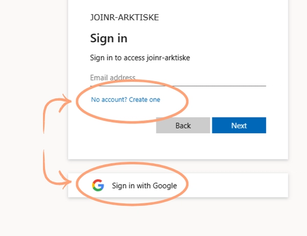
- Select “Use Another Account” by clicking the plus (+) symbol.
- Choose either:
- “No account? Create one”, or
- “Sign in with Google”.
Use your personal email address when creating your account. This makes it easier to manage and maintain the association over time. You will be able to add the association’s email address when registering the association in the next step.
Note: If you sign in using a Google account, your email address cannot be changed later.
Step 2: Register Your Association
Once your personal account has been created, you can register your association.
To register your association:
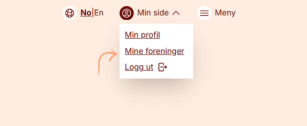
- Go to “My Page”.
- Select “My Associations”.
- Click “Create Association”.
- Complete the association registration form and submit it.
Note: It is currently not possible to save your progress while filling out the form. Make sure all information is completed and the form is submitted before leaving the page.
What Happens After the Association Is Registered?
All new associations are reviewed and approved on an ongoing basis by Student Life. Once approved, your association will become visible in the association directory.
As soon as the registration form has been submitted, you can already:
- Add additional board members
- Create and publish events in the calendar
- Update association information
If any information or documentation is missing—for example, if your constitution/bylaws have not been uploaded correctly—we will contact you before the association page is published. We are happy to provide guidance and support to help you complete the registration process.
Once your association has been approved, you will be ready to increase your visibility among students and promote your activities through the Student Association Portal.
Good luck! 🎉